The Making of Rift: Part 1, I2C Multiplayer
Introduction
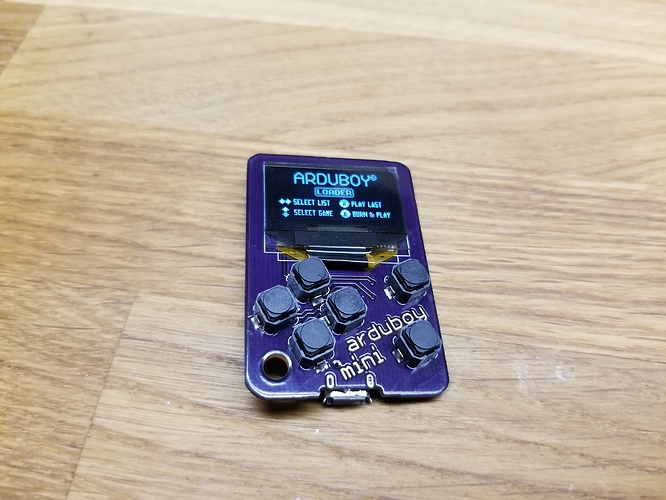
Almost one year ago, my new Arduboy Minis arrived in the mail. Not only were they adorable, but they had an amazing new feature: I2C! With this, two or more Minis could be connected and talk to each other. Little did I know of the rabbit hole I would fall into…
An I2C Primer
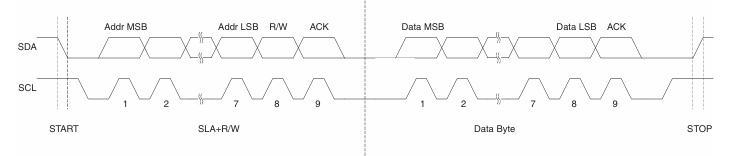
I2C stands for inter-integrated circuit and is a very common protocol of communication using just three wires, SDA (data), SCL (clock), and GND. There are two different roles on an I2C bus: controller (master) and target (slave). The controller can send data and request data. The target can recieve data and send data back when requested. Each target has a unique address, which the controller uses to identify it. Usually, there is one controller and many targets but you can have multiple controllers as well (as discussed later).
A nice diagram from the Atmega32u4 datasheet:
Getting Started: Multiplayer Pong
After I finished my previous game, ArduDemon, I was suprised to see no one had made a multiplayer game. I decided, why not? And so I set out on making a version of Pong for two Minis. The Pong code was relatively straightforward, but the I2C was tricky. I started out as having the player manually indicate which device was the controller and which was the target.
void setup() {
    ...
    while (role == NONE) {
        arduboy.pollButtons();
        if (arduboy.justReleased(A_BUTTON)) {
            // begin as controller
            role = CONTROLLER;
            Wire.begin();
        }
        if (arduboy.justReleased(B_BUTTON)) {
            // begin as target
            role = TARGET;
            Wire.begin(TARGET_ADDRESS);
            // setup callbacks
            Wire.onRequest(data_request);
            Wire.onReceive(data_recieve);

        }
    }
    ...
}
Callbacks for the recieving and transmitting would transfer data between the target and the controller.
// target callbacks
void data_recieve(int bytes) { // callback for when controller sends a message
    while (Wire.available()) { // if there is somthing in the rx buffer
        // update globals
        player_y[CONTROLLER] = Wire.read();
        ball_x = Wire.read();
        ball_y = Wire.read();
        player_score[CONTROLLER] = Wire.read();
        player_score[TARGET] = Wire.read();
    }
}
void data_request() { // callback for when controller requests a message
    Wire.write(player_y[role]);
    Wire.write(arduboy.pressed(A_BUTTON));
}
void loop() {
    ...
    if (role == CONTROLLER) {
        ...
        Wire.beginTransmission(TARGET_ADDRESS);
        Wire.write(player_y[CONTROLLER]);
        Wire.write(ball_x);
        Wire.write(ball_y);
        Wire.write(player_score[CONTROLLER]);
        Wire.write(player_score[TARGET]);
        Wire.endTransmission();
        ...
    }
    ...
}
Handshaking
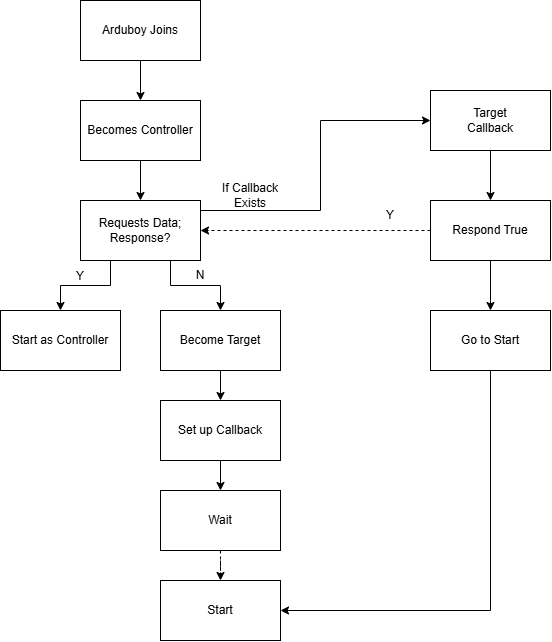
This approach worked rather well, but had the downside of having the player have to manually determine whice device was the controller or target. To fix this, I thought of a clever idea:
The first device would become the controller and try to read from the other. If there was no response, it would become the target and set up a callback to start when it receives as message. Then, when the second device would come along, it would try to read from the other, but this time it would actually succeed. It would stay the controller and start. The first device, having received a message, would also start.
// must be volatile because it is changed in the callback
volatile bool handshake_completed = false;

void handshake_request() {
    Wire.write(true);
    handshake_completed = true;
}
Wire.begin();
Wire.requestFrom(TARGET_ADDRESS, 1);
if (Wire.available()) { // already a target here
    role = CONTROLLER;
    handshake_completed = Wire.read();
} else {
    role = TARGET;
    Wire.begin(TARGET_ADDRESS);
    Wire.onRequest(handshake_request);
}

while (!handshake_completed) {}

// setup callbacks
if (role == TARGET) {
    Wire.onRequest(data_request);
    Wire.onReceive(data_receive);
}
Note that handshake_completed must be volatile to disable the compiler, intelligently seeing that the callback is never called directly, optimizing handshake_completed away as that is the only time it is set.
This worked great! No longer did you have to manually set each player’s role; it was done automatically.
The Raycaster Enters Stage Left
As luck would have it, I had spend the past month working on a fast fixed-point raycaster (which could and hopefully will be its own blog post). I decided to integrate my logic into it. The result was quite fantastic.
See also: